Firefox Modularity and WebExtensions
Saturday, September 3rd, 2016Last week, Andy McKay posted skeptical thoughts about whether Firefox system addons (also known as go-faster addons) should be required to use the WebExtensions API surface. I believe that all Firefox gofaster addons, as well as our Test Pilot experiments and SHIELD studies, should use WebExtensions. The explanation comes in three main areas:
- The core limiting factor in our ability to go faster while still shipping high-quality software isn’t the packaging and shipping mechanisms for our code. It’s the modularity and module boundaries of our codebase.
- The module structure and API surfaces of the Firefox/gecko codebase is hurting our product quality, hurting our teams and our ability to attract volunteer contributors, and hurting our ability to go faster. But there are some shining counter-examples!
- WebExtensions should be the future for module boundaries in the Firefox frontend. It’s worth planning carefully and going slow enough to get good module boundaries first, so that we can go blazingly fast later.
- Coda: by sticking to a single model for Firefox addons and builtin system addons, we can focus supporting work more effectively and make life better for both addon authors and Firefox engineers.
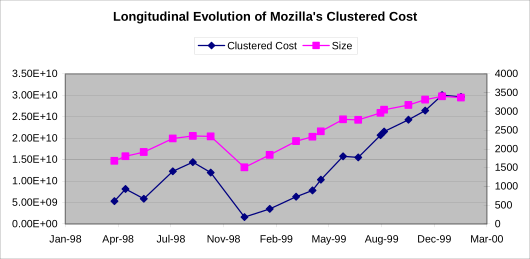
There is a long history of academic research about software modularity. I remember the OSCON talk in 2006 when I first heard about Exploring the Structure of Complex Software Designs: An Empirical Study of Open Source and Proprietary Code: this talk and paper has changed the way I think about software structure and open source and how to organize engineering teams including volunteers. (Incidentally, this seems like another way of saying “everything that’s important to me at work”.)
Quoting one of the followup papers that studies the impact of software modularity on change over time:
Specifically, we show that i) tightly-coupled components are “harder to kill,” in that they have a greater likelihood of survival in subsequent versions of a design; ii) tightly-coupled components are “harder to maintain,” in that they experience more surprise changes to their dependency relationships that are not associated with new functionality; and iii) tightly-coupled components are “harder to augment,” in that the mix of new components added in each version is significantly more modular than the legacy design.
—Alan MacCormack, John Rusnak, and Carliss Y. Baldwin. The Impact of Component Modularity on Design Evolution: Evidence from the Software Industry.
The structure and connectedness of modules in a codebase determines what you can change easily (and therefore quickly) and what things have to change slowly. There is not a single design for a software project: you have to design the structure of your modules and interfaces based on what may need to change in the future. Even more fundamentally, the shape and structure of APIs and modules determines where teams can be innovative most successfully. Relatedly, module size and structure determines where contributors can be most effective and feel most welcome.
There are some shining success stories at Mozilla where good modular design has allowed teams to work independently and quickly. The devtools debugging API is a great example of carefully designing an API surface which then allowed the team to move quickly and innovate. The team spent a lot of time refactoring guts within the JS engine to expose a debugging API which wasn’t tightly tied to the underlying platform. And since devtools are isolated from the rest of the browser in an iframe, there is a natural separation which allows them to be developed as a unit and independently. The advantages of this model became quickly apparent when the team started reusing the same basic debugging structure for a desktop Firefox to debug content in Firefox for Android, or debug the Firefox chrome itself, or even debug content in Chrome!
A lot of the pain and slowness in Firefox development relates to our code not having well-defined, documented, or enforced module boundaries or interfaces. Within the Firefox frontend itself, we have many different kinds of functionality that runs in the single technical context of the main browser window. We sometimes pretend that there are relatively clean boundaries between the Firefox frontend and the underlying platform, but this is a myth. There are pervasive implementation dependencies between things like the tab browser in the frontend and the network/docshell/PSM validation in the platform which often have to be modified together.
Lack of clean modules and interfaces manifest themselves in many ways. It is notoriously difficult to write tests for Firefox. This is pretty natural, since good tests often focus on the interface boundaries between modules. It also makes it extremely difficult to “mock” unrelated modules cleanly for a test. The pervasiveness of “random oranges” is not because tests are written poorly: it is most related to tests being very difficult to write well.
Historically problems maintaining and building Firefox addons and the addon ecosystem is directly related to not having an API surface for addons. Because writing an addon usually involved hacking into the structure of the browser.xul DOM and JS, it was natural that addon authors were frequently affected by browser changes. And it was very difficult for anyone, Firefox hacker or addon hacker alike, to know whether or how any particular change would affect addons. The most common complaint from addon authors was that we didn’t have good API documentation; but this is not a problem with the documentation. It’s a problem of not having good APIs. Similarly, a major user complaint was that addons break too often. This is not a problem of addon authors being bad coders; it is more fundamentally a lack of stable API surfaces that would allow anyone to write code that continues working over time.
In order to make addon development fun and productive again, we’ve made big investments in WebExtensions. WebExtensions is a clearly specified, tested, documented, and maintained API surface targeted at addons. The WebExtensions system will allow addon authors to innovate and be creative within a structure that lets Firefox support them over time. Over the next year, we expect basically all Firefox addons to move to WebExtensions. We’ve already seen this energize the addon community and especially promote addon development by authors who gave up developing old-style Firefox addons.
Within Firefox development itself, we need this same combination of structure and innovation. Starting with the new system addons, we need to spend the time up front to build API surfaces that allow teams within Mozilla to experiment and build new systems safely, with the confidence that they aren’t going to break Firefox by accident. We need to have enough foresight to say where we want to experiment, so that we can make sure that we have the right API and module boundaries in place so that experiments can be successful.
If our system addons are still coded in a way that depends on the internal structure of browser.xul, or XPCOM, or the network stack, then they have inherently high testing cost. We need to re-validate them against each release, and be very cautious about pushing changes because we don’t know whether any change could break the browser.
If, on the other hand, we use WebExtensions and have technical guarantees that addons are isolated from other code, we have the ability to push new changes aggressively and actually independently. QA and release teams don’t need to test every change extensively and in all combinations: instead we can use the technical isolation guarantees of the WebExtensions API to allow teams to be more completely independent, the same way we want addon authors to be essentially independent.
As we start developing system addons using WebExtensions, there are going to be APIs which we don’t want to commit to, or that we’re not sure about. I think we will have to come up with APIs that are not exposed to all addons, but only to particular system addons where we understand the risks and experimental nature. We are going to need a way for many teams to be responsible for their own API surfaces, and not route every change through the addons engineering team. We should embrace these challenges as the cost of success.
Having more code use WebExtensions is a way to focus engineering efforts. We know that both addons and system code needs better support for profiling and performance monitoring, telemetry, unit testing, localization, and other engineering support functions. By having our system addons use the same basic API layer as external addons, we can build tools that improve life for everyone. The cost of building each of these things well is large, but through shared effort we can make our engineering investment return much greater dividends.
At the end of the day, I believe we should end up in a world where most of the Firefox frontend is made available via system addons and glued together using well-defined API surfaces. What would it be like to have our tabbed browser, location bar, search interface, bookmarks system, session restore, etc be independently hackable? It would be awesome! It would mean a higher quality product, with more opportunities for volunteer contributors to improve specific areas. It would likely mean reduced edit/build/run/test cycles. It might even give addon authors the ability to completely replace certain components of the browser if they so choose.
I shared a draft of this post with Andy and other tech leads and got some great feedback. In order for discussion to go to one place, please post any replies or thoughts to the firefox-dev mailing list.